🏷️ Stop! Check the price first.

We track verified 2026 promo codes for Bear, Helix, Saatva, and 30+ other brands.

See All Coupons →

Kids Sleep Apps: Bedtime Tools and the Kids Sleep Dr Story

Ben
A close-up photo of a smartphone screen displaying an app icon. The icon features a cartoon image of a smiling child sleeping with "Zzz" above their head, set against a black background. Below the image, text reads "Kids Sleep Doctor," highlighting this effective sleep app for children.

What parents should know: A sleep app can help record patterns or organize a bedtime routine, but it cannot diagnose a sleep disorder or guarantee better sleep. Consider an app's privacy, screen use and cost, and ask your child's clinician about persistent sleep concerns.

The Kids Sleep Dr app: what we know

In 2015, Evelina London Children's Hospital announced Kids Sleep Dr, a parent-entered sleep diary with weekly summaries and age-based tips. A related 2025 hospital education page still mentions the project. We have not verified whether the original app is currently available in U.S. app stores, its current features or privacy practices, and we have not tested it.
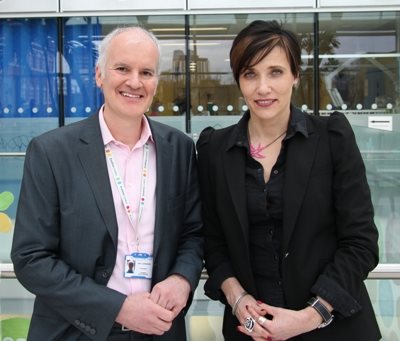
Professor Paul Gringras and Professor Tanya Byron at the Kids Sleep Dr app launch in 2015
Professor Paul Gringras and Professor Tanya Byron at the 2015 Kids Sleep Dr launch. Photo: Evelina London Children's Hospital.

Frequently asked questions

Is the Kids Sleep Doctor app worth it for parents struggling with bedtime routines?

We cannot currently verify availability or evaluate whether the original app is worth downloading. The 2015 hospital announcement described a parent-entered diary and personalized tips; current features may differ.

Who is the Kids Sleep Doctor app best for?

The historical app was designed for families tracking children's sleep patterns. A sleep diary may help parents discuss patterns with a clinician, but it is not a diagnosis.

What are the downsides of the Kids Sleep Doctor app?

We could not confirm the original app's current availability, features, pricing or privacy practices. However, as with any digital tool, effectiveness can vary based on consistent use and individual child temperament.

How does the Kids Sleep Doctor app help improve sleep quality in children?

The historical app collected parent-entered sleep times and supplied age-based tips; we could not verify a current version or the previously described stories and sounds. A diary can support a conversation about sleep but does not guarantee faster or longer sleep.

Is the Kids Sleep Doctor app good for addressing specific sleep issues like difficulty concentrating?

We cannot establish that the app treats concentration problems. Sleep difficulties and concentration concerns can have many causes; speak with your child's clinician. A record of sleep and daytime symptoms can help inform that conversation.

Where can I find products in San Diego that complement sleep apps for children?

You can explore children's sleep products that complement apps like Kids Sleep Doctor at Yawnder's Encinitas, CA showroom, where you can find mattresses and bedding solutions. Contact the showroom about current availability. Bedding is not a treatment for sleep difficulties.

Want to test this in person? Visit our Encinitas showroom or call 858-232-5760.

Keep exploring
More sleep guidance

Browse Yawnder’s sleep education, research explainers, and practical guides.

Explore sleep guides

How much sleep do children need?

The CDC's age-based recommendations are ranges, not a diagnosis: children 1–2 years generally need 11–14 hours per 24 hours, ages 3–5 need 10–13 hours, ages 6–12 need 9–12 hours and teens 13–18 need 8–10 hours. The ranges for younger children include naps. Needs differ, and a pediatrician can help assess a child's pattern.

How to keep a useful sleep log

For one or two weeks, record bedtime, approximate time asleep, wake-up time, naps and notable nighttime awakenings. Note symptoms such as frequent snoring or daytime sleepiness. A paper notebook works as well as an app; share the record with your child's clinician if you have concerns. A phone cannot reliably diagnose sleep apnea by itself.

Check privacy and payment before downloading

Look for a clear developer and recent updates. Read what data the app collects, whether recordings leave the device, who can access them and how to delete them. Check trial expiration, subscription renewal, ads and whether features work without an account. Avoid entering unnecessary identifying information about a child.

For babies, use a separate, firm, flat sleep surface and follow the AAP safe-sleep recommendations. Keep phones, speakers, cords and other objects out of the sleep space.

What sleep apps for children can realistically do

Apps for children's sleep mostly do three things: they run a predictable bedtime routine, they provide audio such as stories, white noise or breathing exercises, and they give parents a simple log of bedtimes and wake-ups. A consistent routine and a simple log may help, although every family's needs differ.

An app cannot diagnose or fix a sleep problem. Loud snoring, long pauses in breathing, extreme daytime sleepiness or bedtime battles that last months are worth raising with your paediatrician.

What to look for before installing

Check whether the app works offline, so it does not need a bright screen in a dark bedroom. Audio-only playback with the screen off is a better fit for a child's room than a glowing tablet.

Read the privacy policy for anything that records audio or asks for a child's name and birthdate. Prefer apps that keep data on the device and do not run adverts to children.

Building a routine the app supports

Keep the same wind-down order every night — bath, pyjamas, teeth, two stories, lights out — and use the app for one part of it rather than the whole thing. Predictability is what children respond to, not novelty.

Dim the lights an hour before bed, keep the bedroom cool and dark, and hold the wake-up time steady on weekends. If a story or sound track becomes a requirement for falling asleep, fade it out gradually so your child can settle without it.

FAQs

What age can a child use a sleep app?

Audio and routine features suit toddlers and older with a parent running them. Screens in the bedroom are best avoided for young children.

Do white-noise apps harm hearing?

If used for a baby, the AAP recommends the lowest practical volume, as much distance from the baby as possible, and limited duration. Keep devices and cords out of the sleep space.

Will an app replace sleep training?

No. It may support a routine. Whether a behavioral plan is helpful depends on the child; a clinician can help with ongoing concerns.

Do Not Sell or Share My Personal Information Privacy Policy
Y

Yawnder

We typically reply in a few minutes

👋 Hi there!

Have a question about mattresses, deliveries, or your order? We're here to help.